
COPRA RF Sections
Software solution for open and closed profiles
Our COPRA RF Sections module is specifically tailored to the design and processing of both open and closed cross-sections and is equally suitable for simple and complex profiles.
Since the software was launched in 1987, we have been continuously adapting COPRA RF to the ever-changing requirements of profile manufacturers. Thinner wall thicknesses, new materials, improved roll forming machines as well as more and more pre- and post-processing steps require a software solution that masters the balancing act between sufficient complexity and usability.
In combination with other modules such as COPRA RF Roll Design or our analysis tools, COPRA RF Sections encompasses all stages of the design process of roll formed profiles to the highest quality.
COPRA RF Sections - at a glance
- Parametric processing with SpreadSheet
- Direct link to the simulation module COPRA FEA RF - verification possible at any time
- Punch Hole Editor: Modification of 2/3D model
- User interface with current "Ribbon Technology"
- Visualization of coatings and laminates
- Strip width calculation (different methods available)
- Calculation of springback and, results can be created directly as a new forming step design stitch
- Interface to Autodesk Inventor and SolidWorks (once created, models are also updated in the 3D model)
Profile design with COPRA RF Sections
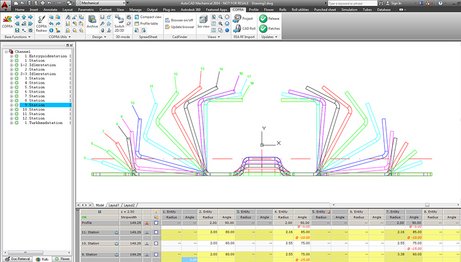
In combination with other powerful tools, COPRA RF Sections offers convenient options for designing the end profile cross-section, including parametric processing in tabular form with COPRA RF Spreadsheet. The contour can be either drawn by the user, taken from customer data and CAD models, or assembled from predefined profile modules. In case of a punched profile, the model can be edited with the integrated Punch Hole Editor.
COPRA RF utilizes the current "Ribbon Technology" of AutoCAD as its user interface. Standard bending and forming sequences can be predefined and used as needed. Punched holes or embossings are taken into account by COPRA RF during the design of the unwind flowers. The software also transfers these details to a later finite element simulation process with COPRA FEA RF.
Visualization of coatings and laminates
Materials that have already been coated or painted are frequently roll formed, such as roller shutters, venetian blinds, louvres and many other products. However, roll formed thermoplastic hybrid profiles and fiber reinforced metal hybrid profiles with thermoplastic matrix, are also an important part of environmentally friendly lightweight design concepts in today's automotive or aircraft industry. To avoid surface damage, the designer can assign areas coated or laminated with COPRA RF, and display them in the flower pattern - across the entire roll forming line.